

 模具
模具 .csv文件格式

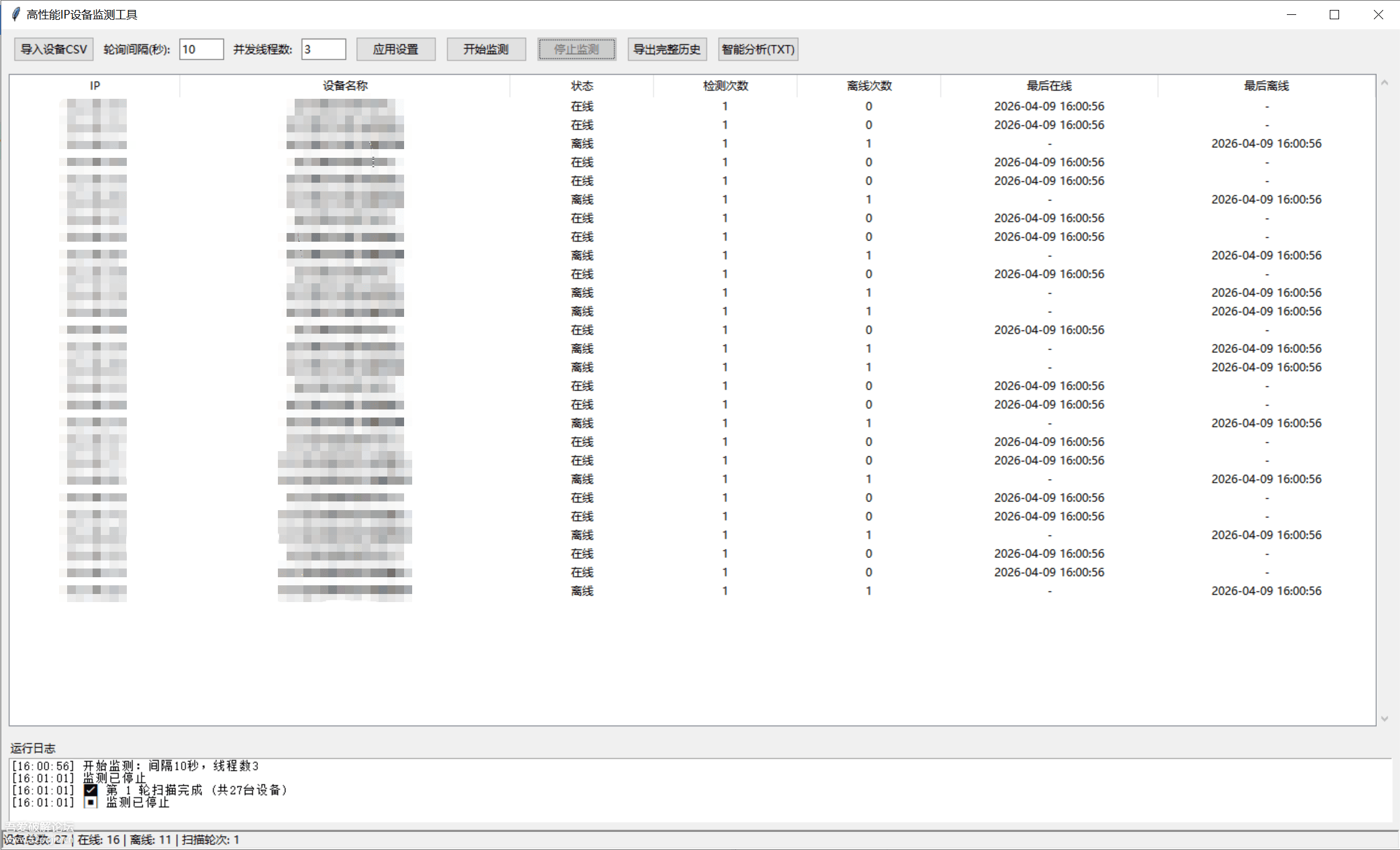
1、先写.csv文件把序号、设备名称、IP地址编辑上; 2、打开软件,点击导入; 3、设置间隔时间、启用限乘,点击应用设置; 4、点击开始监测; 5、手动点击停止监测,可以导出完整的检测历史以及智能分析。
项目概述 这是一个基于Python Tkinter开发的IP设备在线监测工具,主要用于批量监测网络设备的在线状态,提供实时监控、历史记录、智能分析等功能。 核心功能
- 设备管理 支持CSV文件批量导入设备信息 实时显示设备在线状态 记录设备检测历史
- 监测功能 自定义轮询间隔时间 可配置并发线程数 实时在线/离线状态检测
- 数据分析 设备稳定性分析 在线率统计 问题设备识别 智能报告生成 技术实现要点 1.多线程架构
# 使用线程事件控制监测状态
is_monitoring_event = threading.Event()

# 线程池并发执行ping检测
with ThreadPoolExecutor(max_workers=thread_count) as executor:
future_to_ip = {executor.submit(self.ping, d["ip"]): d["ip"] for d in DEVICE_LIST}- UI性能优化 UI更新队列机制,避免频繁界面重绘 批量处理UI更新任务 优化表格数据更新算法
- 数据同步机制 使用线程锁保护共享数据 队列通信避免UI阻塞 原子操作保证数据一致性
- 网络检测优化 设置合理的超时时间 优化ping命令参数 错误处理和异常恢复 性能优化策略
- 界面流畅度优化 UI更新频率控制在100ms 批量处理UI更新任务 只更新变化的数据项
- 内存管理 及时清理不需要的历史数据 合理的数据结构设计 避免内存泄漏
- 网络性能 并发线程数可配置 单次ping超时控制 网络请求优化
代码结构:
DeviceMonitorApp
├── UI组件管理
│   ├── 设备导入
│   ├── 参数设置
│   ├── 状态显示
│   └── 日志输出
├── 监测引擎
│   ├── 扫描调度
│   ├── 网络检测
│   └── 数据处理
└── 数据分析
    ├── 历史记录
    ├── 统计分析
    └── 报告生成
关键技术点
- 线程安全的UI更新 通过队列机制实现后台线程与UI线程的安全通信,避免界面假死。
- 高效的数据结构 使用字典存储设备状态,列表记录历史数据,优化查找和更新性能。
- 智能分析算法 基于设备历史数据计算可靠性指标,识别问题设备。 使用场景 网络管理员监控设备状态 IT运维团队设备管理 系统集成商项目维护 网络质量监控分析
import tkinter as tk
from tkinter import ttk, filedialog, messagebox
import subprocess
import time
import csv
import os
from datetime import datetime
import threading
from concurrent.futures import ThreadPoolExecutor
import queue
# ==================== 全局控制 ====================
DEVICE_LIST = []
device_data = {}
is_monitoring_event = threading.Event()
SCAN_ROUND = 0
data_lock = threading.Lock()
ui_queue = queue.Queue()
history_log = []
# 文件
LOG_FILE = f"设备在线监测日志_{datetime.now().strftime('%Y%m%d%H%M%S')}.csv"
HISTORY_FILE = f"完整扫描历史_{datetime.now().strftime('%Y%m%d%H%M%S')}.csv"
class DeviceMonitorApp(tk.Tk):
def __init__(self):
super().__init__()
self.title("高性能IP设备监测工具")
self.geometry("1500x880")
# 界面组件
self.edt_interval = None
self.edt_threads = None
self.btn_start = None
self.btn_stop = None
self.log_text = None
self.tree = None
self.status_bar = None
self.create_ui()
self.init_files()
self.setup_ui_updater()
def setup_ui_updater(self):
"""设置UI更新器"""
self.check_ui_queue()
def check_ui_queue(self):
"""定期检查UI更新队列,批量处理UI更新以减少卡顿"""
try:
updates = []
while True:
task = ui_queue.get_nowait()
updates.append(task)
except queue.Empty:
pass
# 批量处理UI更新,减少界面重绘次数
if updates:
for task in updates:
if task[0] == "refresh_table":
self._refresh_table()
elif task[0] == "log":
self._add_log(task[1])
elif task[0] == "update_status_bar":
self._update_status_bar(task[1])
# 每100毫秒检查一次UI更新队列,平衡性能和响应性
self.after(100, self.check_ui_queue)
def init_files(self):
if not os.path.exists(LOG_FILE):
with open(LOG_FILE, "w", encoding="utf-8-sig", newline="") as f:
csv.writer(f).writerow(["时间", "设备名称", "IP", "状态"])
def create_ui(self):
# 顶部工具栏
top = ttk.Frame(self, padding=8)
top.pack(fill=tk.X)
ttk.Button(top, text="导入设备CSV", command=self.import_csv).grid(row=0, column=0, padx=5)
ttk.Label(top, text="轮询间隔(秒):").grid(row=0, column=1, padx=3)
self.edt_interval = ttk.Entry(top, width=6)
self.edt_interval.insert(0, "10")
self.edt_interval.grid(row=0, column=2, padx=5)
ttk.Label(top, text="并发线程数:").grid(row=0, column=3, padx=3)
self.edt_threads = ttk.Entry(top, width=6)
self.edt_threads.insert(0, "3")
self.edt_threads.grid(row=0, column=4, padx=5)
ttk.Button(top, text="应用设置", command=self.apply_settings).grid(row=0, column=5, padx=5)
self.btn_start = ttk.Button(top, text="开始监测", command=self.start_monitor)
self.btn_start.grid(row=0, column=6, padx=5)
self.btn_stop = ttk.Button(top, text="停止监测", command=self.stop_monitor, state=tk.DISABLED)
self.btn_stop.grid(row=0, column=7, padx=5)
ttk.Button(top, text="导出完整历史", command=self.export_history).grid(row=0, column=8, padx=5)
ttk.Button(top, text="智能分析(TXT)", command=self.make_analysis).grid(row=0, column=9, padx=5)
# 表格
table_frame = ttk.Frame(self)
table_frame.pack(fill=tk.BOTH, expand=1, padx=8, pady=5)
cols = ["IP", "设备名称", "状态", "检测次数", "离线次数", "最后在线", "最后离线"]
self.tree = ttk.Treeview(table_frame, columns=cols, show="headings", height=18)
widths = [130, 300, 100, 100, 100, 180, 180]
for c, w in zip(cols, widths):
self.tree.heading(c, text=c)
self.tree.column(c, width=w, anchor="center")
sy = ttk.Scrollbar(table_frame, orient=tk.VERTICAL, command=self.tree.yview)
self.tree.configure(yscrollcommand=sy.set)
sy.pack(side=tk.RIGHT, fill=tk.Y)
self.tree.pack(fill=tk.BOTH, expand=1)
# 日志
log_frame = ttk.Frame(self, padding=8)
log_frame.pack(fill=tk.X)
ttk.Label(log_frame, text="运行日志").pack(anchor="w")
self.log_text = tk.Text(log_frame, height=5, state=tk.DISABLED)
self.log_text.pack(fill=tk.X, expand=1)
# 状态栏
self.status_bar = ttk.Label(self, text="就绪", relief=tk.SUNKEN, anchor=tk.W)
self.status_bar.pack(side=tk.BOTTOM, fill=tk.X)
def _update_status_bar(self, text):
"""直接更新状态栏"""
self.status_bar.config(text=text)
def _add_log(self, msg):
"""直接添加日志消息,减少不必要的操作"""
self.log_text.config(state=tk.NORMAL)
self.log_text.insert(tk.END, f"[{datetime.now().strftime('%H:%M:%S')}] {msg}\n")
self.log_text.see(tk.END)
self.log_text.config(state=tk.DISABLED)
def log(self, msg):
"""线程安全的日志记录"""
ui_queue.put(("log", msg))
# ==================== 导入设备 ====================
def import_csv(self):
path = filedialog.askopenfilename(filetypes=[("CSV文件", "*.csv")])
if not path:
return
try:
with data_lock:
DEVICE_LIST.clear()
device_data.clear()
# 清空表格
self.tree.delete(*self.tree.get_children())
enc = "utf-8-sig"
try:
with open(path, "r", encoding="utf-8-sig") as f:
list(csv.reader(f))
except UnicodeDecodeError:
enc = "gbk"
devices_to_add = []
with open(path, "r", encoding=enc) as f:
reader = csv.reader(f)
next(reader)
for row in reader:
if len(row) >= 3:
no, name, ip = row[0].strip(), row[1].strip(), row[2].strip()
devices_to_add.append({"ip": ip, "name": name})
with data_lock:
for device in devices_to_add:
ip = device["ip"]
DEVICE_LIST.append(device)
device_data[ip] = {
"name": device["name"], "status": "未知", "check": 0, "offline": 0,
"last_up": "-", "last_down": "-", "history": []
}
# 在主线程中批量更新UI
batch_size = 50 # 批量添加,减少界面更新次数
for i in range(0, len(devices_to_add), batch_size):
batch = devices_to_add[i:i+batch_size]
for device in batch:
ip = device["ip"]
name = device["name"]
self.tree.insert("", "end", values=(ip, name, "未知", 0, 0, "-", "-"))
# 强制界面更新
self.update_idletasks()
self.log(f"✅ 导入 {len(devices_to_add)} 台设备")
self._update_status_bar(f"设备总数: {len(devices_to_add)} | 在线: 0 | 离线: 0 | 扫描轮次: 0")
except UnicodeDecodeError:
messagebox.showerror("错误", "文件编码格式不支持,请使用UTF-8或GBK编码")
except Exception as e:
messagebox.showerror("错误", f"导入失败:{str(e)}")
def apply_settings(self):
try:
sec = int(self.edt_interval.get().strip())
thr = int(self.edt_threads.get().strip())
if sec <= 0 or thr <= 0:
raise ValueError("数值必须大于0")
self.log(f"✅ 设置已生效 → 间隔:{sec}秒 | 并发线程:{thr}")
except ValueError:
messagebox.showerror("错误", "请输入有效的正整数")
# ==================== PING 检测 ====================
def ping(self, ip):
try:
si = subprocess.STARTUPINFO()
si.dwFlags |= subprocess.STARTF_USESHOWWINDOW
result = subprocess.run(
f"ping -n 1 -w 1000 {ip}",
stdout=subprocess.PIPE,
stderr=subprocess.PIPE,
startupinfo=si,
timeout=2
)
return b"TTL=" in result.stdout
except subprocess.TimeoutExpired:
return False
except Exception:
return False
# ==================== 扫描一轮 ====================
def scan_one_round(self, round_num):
now = datetime.now().strftime("%Y-%m-%d %H:%M:%S")
results = {}
# 从界面获取线程数设置
try:
thread_count = max(1, min(20, int(self.edt_threads.get().strip())))
except ValueError:
thread_count = 3 # 默认值
# 使用线程池并发执行ping检测
with ThreadPoolExecutor(max_workers=thread_count) as executor:
future_to_ip = {executor.submit(self.ping, d["ip"]): d["ip"] for d in DEVICE_LIST}
for future in future_to_ip:
if not is_monitoring_event.is_set():
return
ip = future_to_ip[future]
try:
results[ip] = future.result(timeout=3)
except Exception:
results[ip] = False
# 记录本轮扫描结果到历史
round_history = {
"round": round_num,
"time": now,
"results": {}
}
# 更新设备状态并记录历史
with data_lock:
for device in DEVICE_LIST:
ip = device["ip"]
if ip in device_data:
data = device_data[ip]
is_online = results.get(ip, False)
data["check"] += 1
status = "在线" if is_online else "离线"
if is_online:
data["last_up"] = now
else:
data["offline"] += 1
data["last_down"] = now
data["status"] = status
# 记录到设备历史
data["history"].append({
"round": round_num,
"time": now,
"status": status
})
# 记录到整体历史
round_history["results"][ip] = {
"name": data["name"],
"status": status,
"check": data["check"],
"offline": data["offline"]
}
# 添加到全局历史记录
history_log.append(round_history)
self.log(f"✅ 第 {round_num} 轮扫描完成 (共{len(DEVICE_LIST)}台设备)")
# ==================== 监测主循环 ====================
def monitor_loop(self):
global SCAN_ROUND
SCAN_ROUND = 0
self.log("▶ 开始监测")
while is_monitoring_event.is_set():
SCAN_ROUND += 1
start_time = time.time()
self.scan_one_round(SCAN_ROUND)
# 计算本次扫描耗时
elapsed = time.time() - start_time
# 从界面获取间隔时间设置
try:
interval = int(self.edt_interval.get().strip())
except ValueError:
interval = 10 # 默认10秒
# 等待剩余时间
remaining = interval - elapsed
if remaining > 0:
while remaining > 0 and is_monitoring_event.is_set():
sleep_time = min(0.1, remaining)
time.sleep(sleep_time)
remaining -= sleep_time
else:
continue
self.log("⏹ 监测已停止")
# 发送最终更新
ui_queue.put(("refresh_table",))
ui_queue.put(("update_status_bar", f"设备总数: {len(device_data)} | 监测结束"))
def _refresh_table(self):
"""内部方法:实际刷新表格显示,减少界面重绘"""
current_data = {}
with data_lock:
current_data.update(device_data)
# 获取当前所有项目的ID
items = self.tree.get_children()
# 批量更新现有项目
updated_count = 0
for item_id in items:
values = self.tree.item(item_id)['values']
if values and len(values) > 0:
ip = values[0] # IP地址在第一列
if ip in current_data:
data = current_data[ip]
new_values = (
ip,
data["name"],
data["status"],
data["check"],
data["offline"],
data["last_up"],
data["last_down"]
)
self.tree.item(item_id, values=new_values)
updated_count += 1
# 更新状态栏
total = len(current_data)
online = sum(1 for d in current_data.values() if d["status"] == "在线")
offline = total - online
ui_queue.put(("update_status_bar", f"设备总数: {total} | 在线: {online} | 离线: {offline} | 扫描轮次: {SCAN_ROUND}"))
# ==================== 启动 / 停止 ====================
def start_monitor(self):
if not DEVICE_LIST:
messagebox.showwarning("提示", "请先导入设备")
return
is_monitoring_event.set()
threading.Thread(target=self.monitor_loop, daemon=True).start()
self.btn_start.config(state=tk.DISABLED)
self.btn_stop.config(state=tk.NORMAL)
self.log(f"开始监测:间隔{self.edt_interval.get()}秒,线程数{self.edt_threads.get()}")
def stop_monitor(self):
is_monitoring_event.clear()
self.btn_start.config(state=tk.NORMAL)
self.btn_stop.config(state=tk.DISABLED)
self.log("监测已停止")
# ==================== 导出 ====================
def export_history(self):
name = f"扫描历史_{datetime.now().strftime('%Y%m%d%H%M%S')}.csv"
try:
with open(name, "w", encoding="utf-8-sig", newline="") as f:
w = csv.writer(f)
w.writerow(["轮次", "时间", "IP", "设备名称", "状态", "检测次数", "离线次数"])
for round_hist in history_log:
for ip, result in round_hist["results"].items():
w.writerow([
round_hist["round"],
round_hist["time"],
ip,
result["name"],
result["status"],
result["check"],
result["offline"]
])
messagebox.showinfo("成功", f"已导出完整历史:{name}")
if os.name == 'nt':
os.startfile(name)
except Exception as e:
messagebox.showerror("错误", f"导出失败:{str(e)}")
# ==================== 智能分析 ====================
def make_analysis(self):
with data_lock:
total_devices = len(device_data)
online_count = sum(1 for d in device_data.values() if d["status"] == "在线")
offline_count = total_devices - online_count
# 计算在线率
online_rate = online_count / total_devices * 100 if total_devices > 0 else 0
# 分析设备稳定性
stability_report = []
for ip, data in device_data.items():
total_checks = data["check"]
offline_count_device = data["offline"]
if total_checks > 0:
reliability = ((total_checks - offline_count_device) / total_checks) * 100
else:
reliability = 0
stability_report.append({
"ip": ip,
"name": data["name"],
"reliability": reliability,
"total_checks": total_checks,
"offline_count": offline_count_device
})
# 按可靠性排序
stability_report.sort(key=lambda x: x["reliability"], reverse=True)
# 生成详细报告
report_parts = [
"===== IP设备监测智能分析报告 =====",
f"生成时间:{datetime.now().strftime('%Y-%m-%d %H:%M:%S')}",
f"监测周期:{SCAN_ROUND} 轮扫描",
f"设备总数:{total_devices}",
f"当前在线:{online_count}",
f"当前离线:{offline_count}",
f"整体在线率:{online_rate:.2f}%",
"",
"----- 设备稳定性排名 -----"
]
for i, item in enumerate(stability_report[:10], 1): # 显示前10个最稳定的设备
report_parts.append(f"{i:2d}. {item['name']} ({item['ip']}) - 可靠性: {item['reliability']:.2f}%")
if len(stability_report) > 10:
report_parts.append(f"... 还有 {len(stability_report) - 10} 个设备")
# 最近离线设备
recent_offline = []
for ip, data in device_data.items():
if data["status"] == "离线":
recent_offline.append(f"- {data['name']} ({ip}): 最后离线于 {data['last_down']}")
if recent_offline:
report_parts.extend([
"",
"----- 当前离线设备 -----"
])
report_parts.extend(recent_offline)
# 问题设备识别
problem_devices = [item for item in stability_report if item["reliability"] < 80 and item["total_checks"] > 0]
if problem_devices:
report_parts.extend([
"",
"----- 需要关注的设备 (可靠性<80%) -----"
])
for item in problem_devices:
report_parts.append(f"- {item['name']} ({item['ip']}): 可靠性 {item['reliability']:.2f}%")
# 总结建议
report_parts.extend([
"",
"----- 监测总结 -----",
f"• 整体网络状况: {'良好' if online_rate > 80 else '一般' if online_rate > 50 else '较差'}",
f"• 建议关注: {'当前无紧急问题' if not problem_devices else f'{len(problem_devices)}个低可靠性设备'}",
f"• 建议措施: {'持续观察' if online_rate > 90 else '检查网络配置或设备状态'}"
])
txt = "\n".join(report_parts)
fn = f"智能分析报告_{datetime.now().strftime('%Y%m%d%H%M%S')}.txt"
try:
with open(fn, "w", encoding="utf-8") as f:
f.write(txt)
messagebox.showinfo("完成", f"已生成智能分析报告:{fn}")
if os.name == 'nt':
os.startfile(fn)
except Exception as e:
messagebox.showerror("错误", f"生成报告失败:{str(e)}")
if __name__ == "__main__":
app = DeviceMonitorApp()
app.mainloop()软件页面
文件下载
蓝奏云
cdqx






评论框